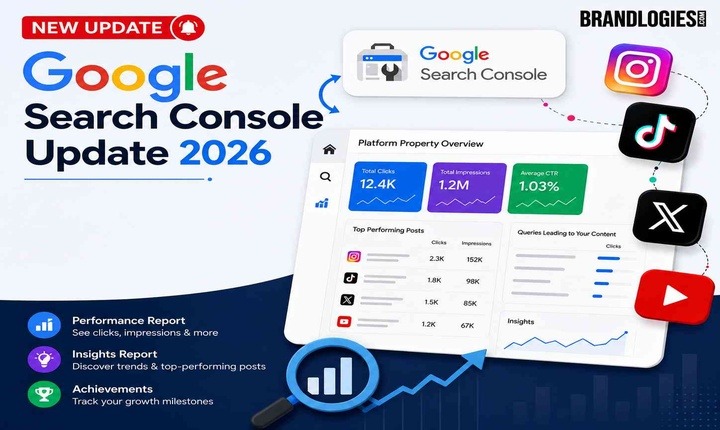
Google Launches Search Console Platform Properties, a new property type that lets you directly link your Instagram, TikTok, X, or YouTube account to Search Console and see how that content performs in Google Search and Discover. Announced on July 7, 2026, through the Search Central Blog, the feature works even for creators who don’t run their own website — you simply connect and verify a supported social or video account instead of a domain. Once linked, a platform property shows which search queries lead people to your posts and how audiences interact with that content, giving creators a consolidated view of their reach across platforms they don’t own or host themselves.
Yes, You Can Finally Link Instagram, TikTok, X, and YouTube to Search Console
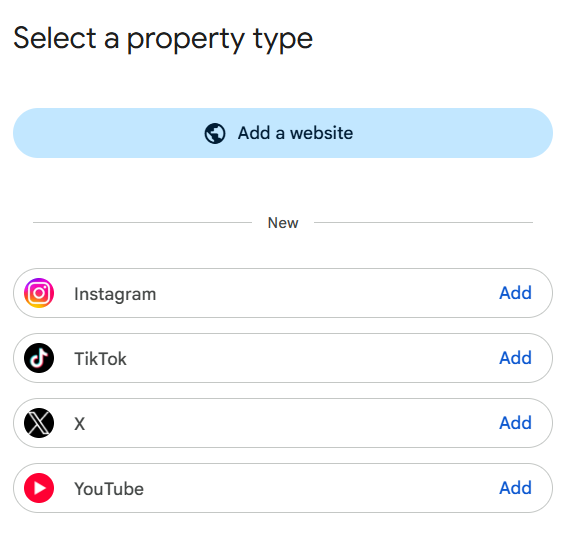
This is the core of the update: Search Console is no longer limited to websites you own and verify. With platform properties, you can connect an Instagram, TikTok, X, or YouTube account the same way you’d add a domain property, and Search Console will start reporting on how that specific account’s content performs in Google Search and Discover.
This matters because content on these platforms could already rank and appear in Google Search results, but creators had no built-in way to measure that visibility unless they also owned a verified website. Linking a social or video account closes that gap directly, without requiring a website at all.
Three New Reporting Features
Once an account is connected, platform properties unlock three dedicated reports inside Search Console:
- Performance report — shows clicks, impressions, and related metrics, with filtering and sorting to identify which posts and search terms drive the most traffic. Data can be exported for use in other analytics tools.
- Insights report — gives a high-level view of recent traffic trends, highlights top-performing posts, and shows how people are discovering the account through Google Search.
- Achievements — tracks growth milestones, such as crossing a new total-click threshold from Search within the previous 28 days.
Expert Tip
Check the Insights report first after connecting an account. It surfaces your top-performing posts and traffic trends immediately, giving you a faster read on what’s working than digging through the full Performance report right away.
How to Link a Platform Property in Search Console
Connecting an account follows a process similar to adding any other Search Console property:
- Open Search Console and use the property selector dropdown, or go to the verification page
- Select Add property
- Choose one of the four supported platforms — Instagram, TikTok, X, or YouTube
- Follow the on-screen steps to securely authorize and verify the connection
Once verified, the account gains access to the Performance, Insights, and Achievements reports described above.
Platform Properties vs Search Profiles
It’s worth separating this update from Search profiles, a different feature Google introduced earlier in 2026.
| Feature | Search Profiles | Platform Properties |
| Purpose | Public profile page consolidating a creator’s content | Private analytics on linked social and video accounts |
| Visible to | Followers and searchers | Only the account owner |
| What it does | Displays content publicly | Reports clicks, impressions, and query data |
| Requires a website | No | No |
A Search profile puts content in front of an audience. A platform property measures how content already performs once you’ve linked the account — two related but separate tools.
Rollout Is Gradual
Google has said platform properties won’t launch globally all at once. Instead, access is rolling out gradually over the coming weeks, so the option to link an account may not appear in every Search Console account immediately. Google is also collecting feedback through the “Submit feedback” option inside Search Console and through the Search Central Community as it continues refining the feature.
Common Mistakes to Avoid
- Assuming you need a website — linking a social or video account works entirely on its own, without any domain property required
- Expecting instant access — the rollout is gradual, so the option may take time to appear in your account
- Treating it as a ranking tool — platform properties report on performance; they don’t influence indexing or rankings
- Confusing it with Search profiles — one is a public content page, the other is private performance data
Many businesses work with experienced digital marketing agencies like Brandlogies to build platform properties data into their broader content reporting once access rolls out.
What This Means for Creators Without a Website
For the first time, creators who’ve never built or verified a website can link their social and video accounts straight to Search Console and see exactly how that content earns visibility in Google Search. As access expands over the coming weeks, it’s worth checking Search Console periodically for the option, then using the Performance and Insights reports to understand which posts and queries are actually driving discovery.
Frequently Asked Questions
1. Do I need a website to use platform properties?
No, the feature is built specifically for creators with or without their own website.
2. What reports do I get after linking an account?
You get a Performance report, an Insights report, and an Achievements section, each tailored to social and video content.
3. Does linking an account affect my Google rankings?
No, this is a measurement feature only and has no effect on indexing or rankings.
4. When will I be able to link my account?
Access is rolling out gradually over several weeks, so availability varies by account.